




Does VPN slow down internet for real? You’re not the only one asking. A VPN (Virtual Private Network) encrypts your data and sends it through an extra server before it reaches the web. That process can affect your speed — but not always in the way you expect.
If you want to keep streaming, gaming, or video calling without lag, understanding why VPNs impact internet speed helps you make the right adjustments. In most cases, the slowdown is minimal and easily fixable. This guide explains why a VPN may slow your connection, and how to keep things fast and secure at the same time.
Why Does VPN Slow Down Internet?
A VPN creates an encrypted tunnel between your device and the VPN server. While this protects your privacy, it can also add some processing time and distance to your connection. Let’s break down the main factors that affect VPN speed.
Encryption Overhead
Encryption is the core of a VPN’s protection. It wraps your data in a secure layer before sending it to the internet. Strong encryption algorithms such as AES-256 or ChaCha20 require more CPU processing, which can cause a slight slowdown.
Most modern devices, however, handle this easily. The speed drop from encryption alone is usually less than 10% — a fair trade-off for complete data privacy.
Server Distance and Load
Another key factor in does VPN slow down internet is distance. The farther your data travels to reach the VPN server, the longer it takes for requests to bounce back. A nearby server in your own country is always faster than one halfway across the globe.
Server load also matters. If a server is crowded, it’s like joining a slow lane on the highway. Data packets queue up, and your speed dips. Many VPN providers display server loads in real time, so choose one with low usage for smoother performance.
ISP Throttling and Hidden Boosts
Here’s the twist: sometimes a VPN can actually speed things up. ISPs often throttle specific activities like streaming, gaming, or torrenting. Because a VPN hides your traffic, your ISP can’t detect what you’re doing — and can’t slow it down selectively.
So, while a VPN technically adds a step in your connection, it may also bypass ISP throttling, resulting in a faster and more stable browsing experience.
How to Test If VPN Slows Down Your Internet
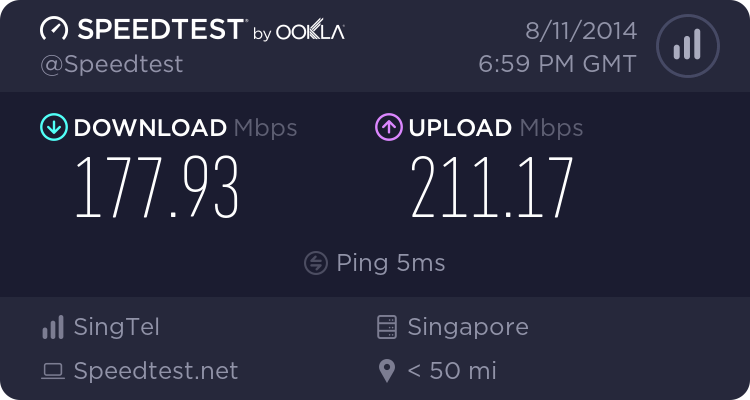
Before assuming your VPN is the culprit, it’s smart to measure your baseline connection. You can do this with a simple online speed test.
Steps to Test Speed Impact
- Run a speed test with your VPN turned off. Note your download, upload, and ping.
- Turn the VPN on and connect to your preferred server.
- Run the test again using the same tool.
- Compare results to determine the difference.
Most premium VPNs maintain 80–90% of your base internet speed. If you see a much larger drop, it’s likely due to server distance or congestion, not the VPN itself.
Choosing the Optimal VPN Server

Selecting the right server makes a bigger difference than most users realize. The closer the server, the faster your data travels.
Pick a Nearby Location
Choose a VPN server geographically close to you. This reduces latency (the time it takes data to travel) and improves your browsing and streaming experience.
Avoid Overloaded Servers
Free or overly popular servers often have high user counts, which causes congestion. If your provider shows server loads, pick one below 70% capacity for consistent speed.
Use Smart Connect Features
Many VPN apps include “Smart Connect” or “Best Server” features that automatically find the fastest, lowest-latency server available. Using this setting ensures optimal performance without manual testing.
Does VPN Slow Down Internet More on Certain Protocols?
Different VPN protocols affect performance in different ways. Some are faster but less secure, while others prioritize encryption strength.
| Protocol | Speed | Security | Recommended For |
|---|---|---|---|
| WireGuard | Very fast | High | Everyday use, streaming, gaming |
| OpenVPN | Moderate | Very high | Privacy-focused tasks |
| IKEv2/IPSec | Fast | Good | Mobile and laptop users |
| PPTP | Fast | Weak | Not recommended |
If your VPN app allows switching protocols, choose WireGuard for the best balance between speed and safety. This single tweak can cut latency and improve download speeds instantly.
Advanced Settings to Keep VPN Fast

Enable Split Tunneling
Split tunneling lets you decide which apps or websites go through the VPN and which connect directly. For example, you might route your banking and emails through the VPN but allow YouTube or local news sites to bypass it.
This frees up bandwidth for streaming or gaming, making your overall connection faster.
Use a Wired Connection
Wi-Fi signals can be inconsistent. Plugging directly into your router via Ethernet often gives more stable and faster results when running a VPN.
Restart Devices Regularly
Routers and computers accumulate temporary data that can clog your network. Restarting once a week clears cache and resets performance levels.
Keep Software Updated
Always use the latest versions of your VPN app and router firmware. Updates often improve server selection, encryption efficiency, and overall speed.
Using a VPN Router to Avoid Slowdowns
A VPN router applies protection across your entire network. Instead of installing a VPN on each device, the router handles encryption for everything — phones, laptops, smart TVs, and IoT devices.
Benefits of a VPN Router
- Protects all devices automatically
- No need for separate VPN apps or logins
- Keeps encryption consistent across your entire home or office
Choosing the Right Router
Look for models with powerful processors (dual-core or higher) and native VPN support. This ensures the router can handle encryption without reducing your speed. If you’re unsure where to start, check out our guide to the best VPN routers in 2025 for reliable, high-performance options.
Additional Optimization Tips
- Restart your router and VPN client weekly
- Avoid connecting to faraway servers unless necessary
- Use 5 GHz Wi-Fi instead of 2.4 GHz for faster local speeds
- Close unused background apps or browser tabs
- Contact your VPN provider’s support — many offer optimized server lists for specific countries
Each of these small tweaks can help you regain lost speed while maintaining your privacy.
Key Takeaways
- A VPN adds encryption and routing overhead, which can slightly affect speed
- Server distance and congestion are the biggest causes of slowdown
- Close, low-load servers and lighter protocols like WireGuard minimize the effect
- Split tunneling and wired connections improve performance further
- VPN routers secure all devices without needing multiple apps
- Regular restarts and updates help keep your connection fast and reliable
When configured properly, a VPN barely affects performance. The privacy benefits far outweigh any minor slowdown.
Final Thoughts on Does VPN Slow Down Internet
So, does VPN slow down internet speeds? Technically, yes — but only a little, and the difference is often unnoticeable. The encryption and rerouting that protect your data naturally add a small delay. Yet, with the right server choice, protocol, and setup, that delay is so minor most users never notice it.
A premium VPN with fast servers and efficient encryption can actually make your connection smoother by bypassing ISP throttling. Whether you’re streaming, gaming, or working remotely, a properly configured VPN gives you both speed and privacy.
Try the tips above today and see how easily you can stay secure online without sacrificing performance.